GAMETRAQ 6 AI Cam
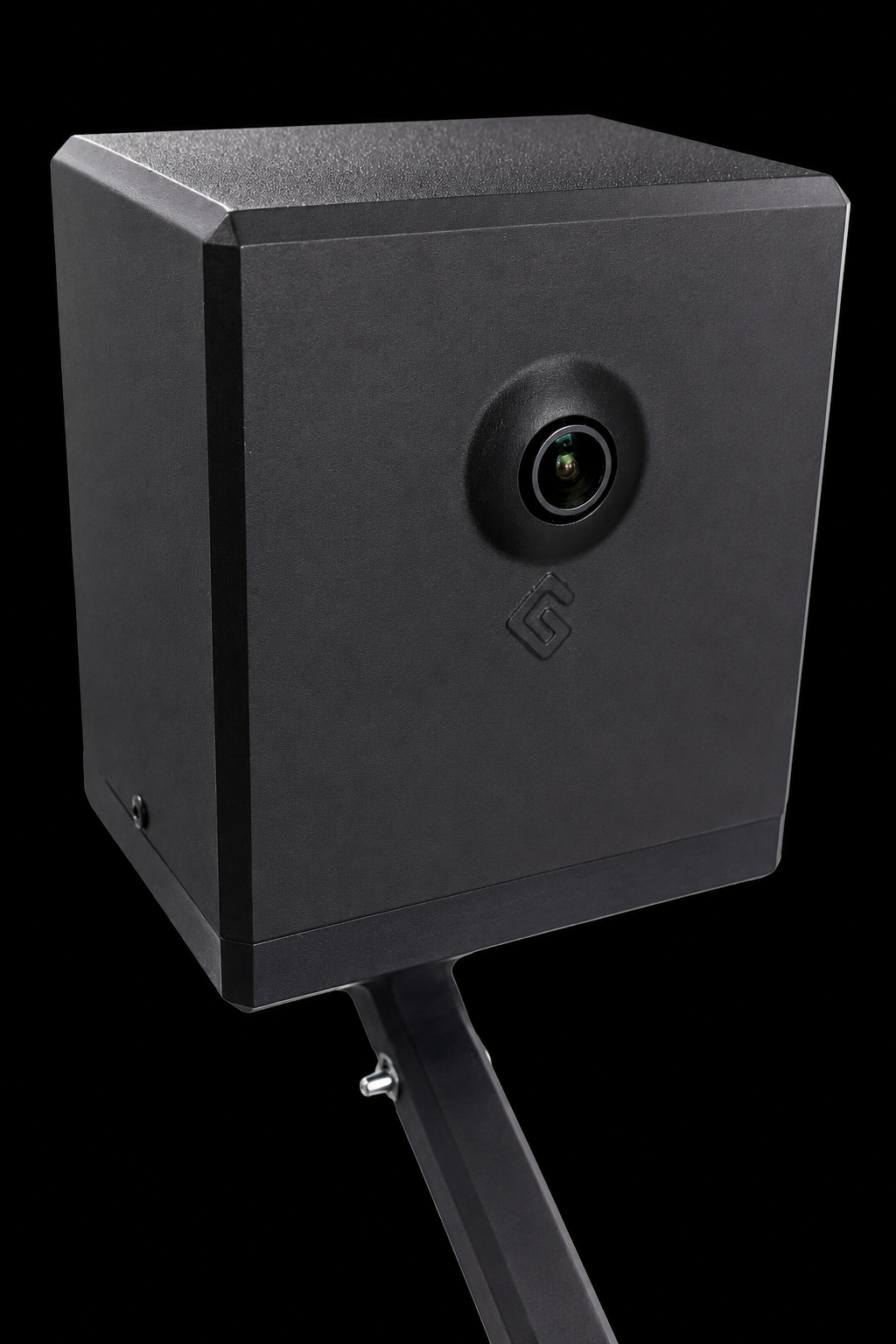
Next-generation 4K AI camera delivering up to 90 FPS, with real-time player tracking, performance data and video analytics.

AI Camera
The leading 4K AI camera for padel clubs.
GAMETRAQ 6 films, streams and analyses every match in 4K at up to 90 FPS, powered by a 12-TOPS on-device AI processor. Every player, rally and shot is tracked in real time — no camera operator, no manual setup.
Run the match from the GameCam controller app: start the tournament, update the score, change player names and add your sponsor overlay to the live broadcast. One press sends it out live — perfect for FIP tournaments, club nights and ladders.
When the match ends, players walk away with automatic highlights and an AI game report, so they relive their best rallies and know exactly what to work on next.
Play. Perform. Improve.
Features
One connected system: the hardware on your court, the AI metrics from every rally and the platform that streams, analyses and monetizes your matches.
Next-generation 4K AI camera delivering up to 90 FPS, with real-time player tracking, performance data and video analytics.
A purpose-built mounting solution for secure installation and the best possible view of your padel court.
Courtside wireless control for updating the score and instantly saving the best rallies and highlights.
A plug-in device that connects to any club TV over HDMI and turns it into an interactive screen with automatic highlights, rankings, club information and sponsor content.
Advanced AI features that capture every moment of the match — delivered to players seconds after the final point.
Records the full match in high-quality video for replay, review, and sharing.
Automatically creates short clips from the best and most exciting rallies.
Generates live player and match statistics during the game.
Shows how far each player has moved during the match.
Measures how much time players spend moving between defense and attack areas.
Shows which player or team controls the rally most during the match.
Counts missed shots and unforced errors from each player or team.
Shows where each player moves most on the court.
Divides the court into areas to show positioning, pressure, and tactical play.
Identifies different shot types, such as volleys, lobs, smashes, and groundstrokes.
Shows where the ball lands on the court for accuracy and placement analysis.
Ranks players based on performance, activity, and match statistics.
Gives a visual overview of each player's strengths and weaknesses across different metrics.
Give players useful performance insights, grow your club's audience and unlock new commercial opportunities.
A complete post-match report with the full 4K video, automatic highlight clips and nine performance metrics for all four players.
An AI-powered coaching experience that analyses the player's match and provides personalized feedback based on what happened on court.
The best of the game, boiled down to a 3-minute video recording of the match.
Players can access their complete recorded match after play, together with highlights, statistics and AI analysis.
Stream matches live directly to your club's own YouTube channel, with simple controls and no external encoder required.
Start live streaming to Instagram directly from the dashboard with only a few clicks.
Produce professional tournament streams with control over player names, live scoring and sponsor advertising, including automatic sponsor videos during breaks and side changes.
Display player names, scores and tournament graphics directly in the live broadcast.
Place court sponsor logos directly in the video so partners stay visible throughout matches, highlights and live streams.
Create a new revenue stream by charging players for access to GameCam's AI video, highlights and performance services.
Manage and monitor every GameCam service in one place, with quick access to videos, analytics, settings and features.
Integrate GameCam video, player data and statistics into your own apps, booking systems and digital environments.
Metrics and platform features included in both plans. Hardware: €950 once on monthly; included in the yearly first-year price.
GameCam TV
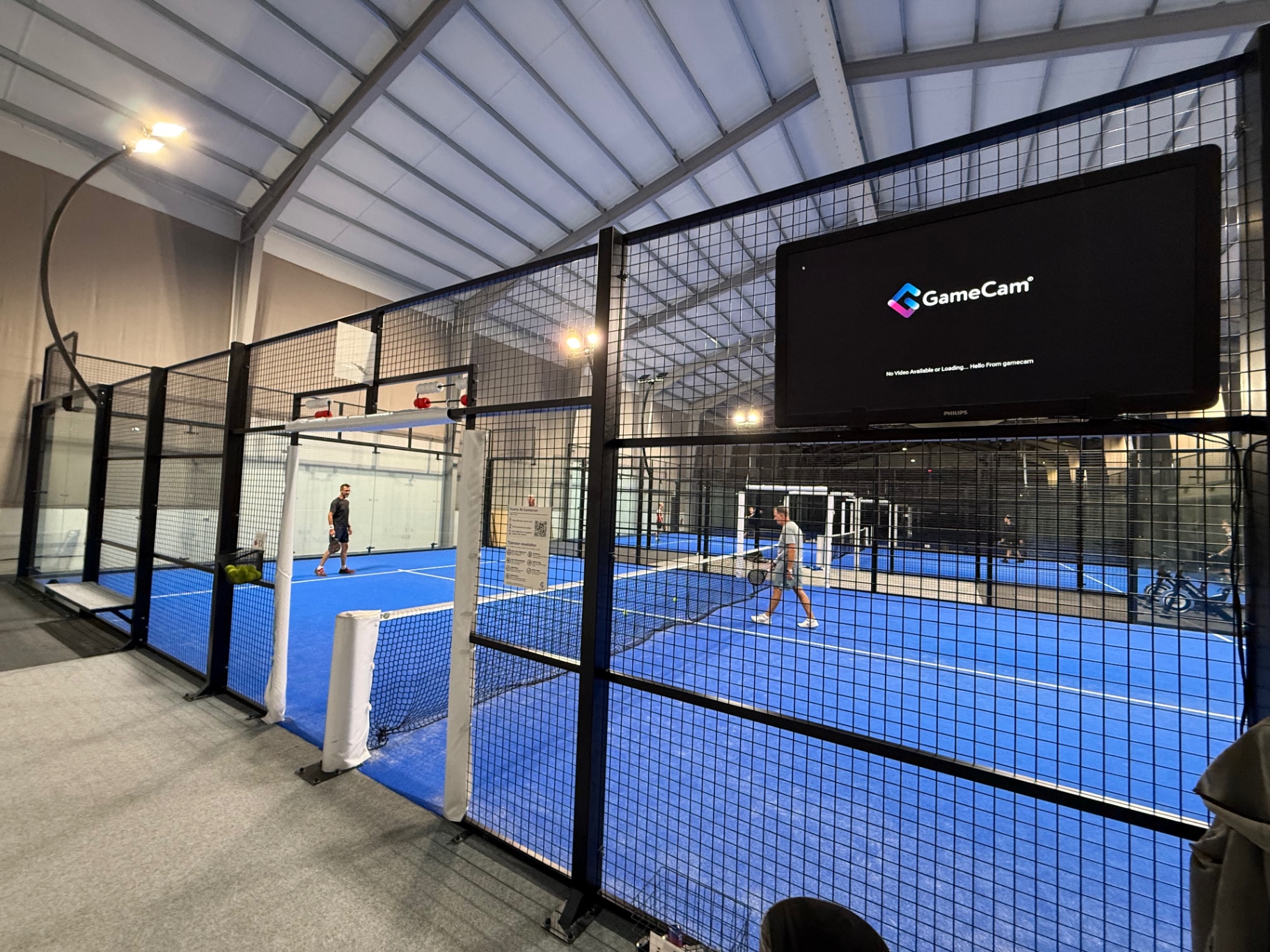
Bring live courts, instant replays, highlights, rankings and sponsor content to every screen in your venue.
Overview
GameCam TV connects the content created by GAMETRAQ 6 with the screens already inside your club. Connect the device via HDMI and turn a standard TV into a continuously updated club channel.
Live courts and player moments keep visitors engaged, while club information and sponsor placements give every screen a commercial purpose.
FAQ
Yes. One GameCam TV device is included with a GAMETRAQ 6 order, together with access to the connected platform features.
GameCam TV works with modern TVs and commercial displays that have an HDMI input. It can be used in reception, cafés, lounges and other shared club areas.
No. Once configured, GameCam TV can automatically rotate live courts, highlights, rankings and scheduled club or sponsor content.
Yes. Clubs can display sponsor logos, videos and campaigns between match content, creating a new in-venue media opportunity.
SLAMS 4 Panel
SLAMS 4 is a wireless four-button control panel installed beside the court and connected to the GAMETRAQ camera system.
Players can press a button during the game to save important rallies, mark highlights and control selected match functions without using a phone. The saved moments are included in the player's video and AI Game Report for review and sharing.
For clubs, SLAMS 4 makes the system simple and accessible for every player. It improves player engagement and allows the club to offer an interactive AI and video experience on the court.
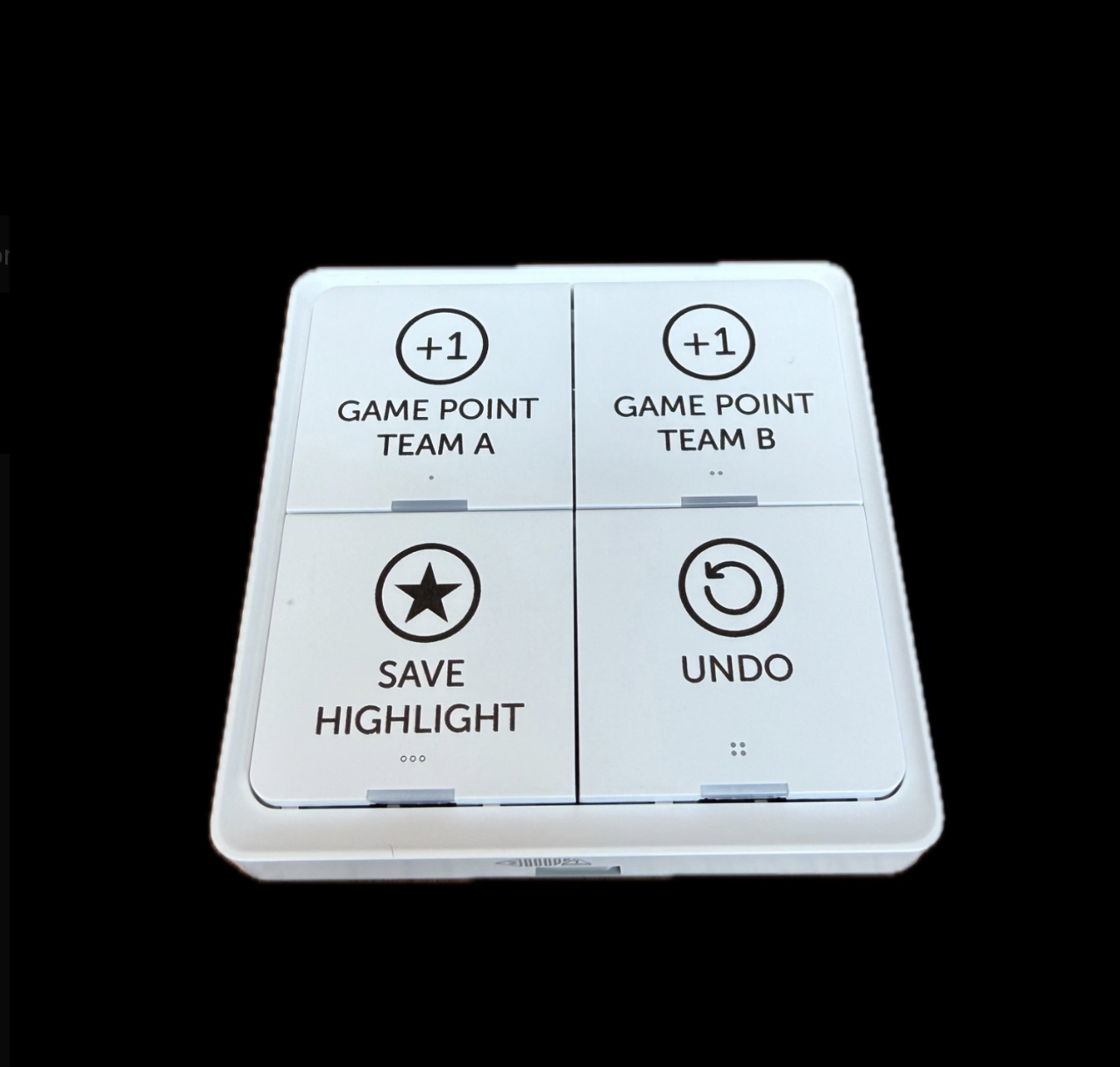
Four buttons — score, highlights, undo. No phone needed.
Tournaments & Broadcast
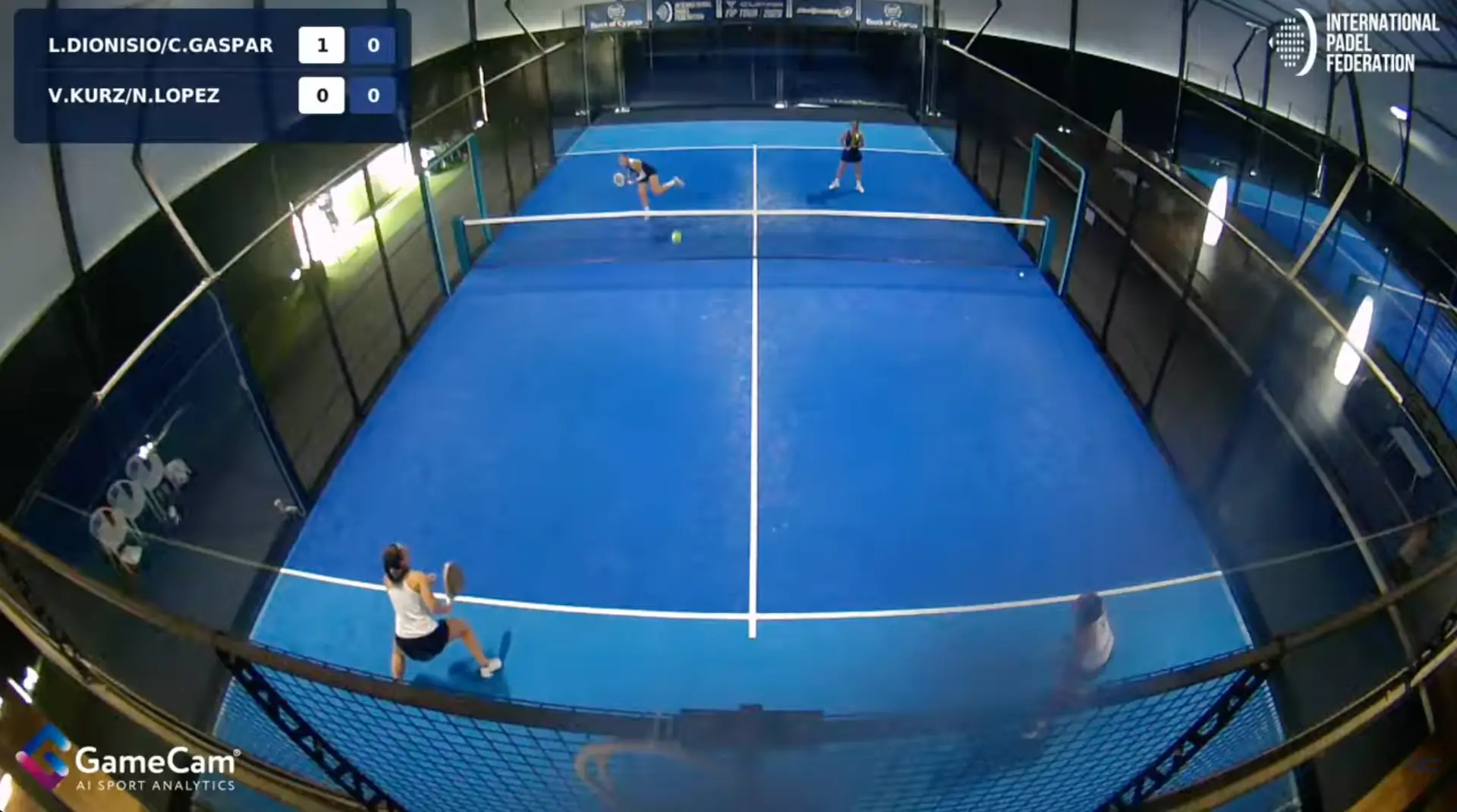
Run tournaments, ladders and exhibitions with live streams, instant replays and broadcast graphics — no production crew required.
Overview
GAMETRAQ 6 gives the club a complete broadcast setup per court. Start the stream from the SLAMS panel or the GameControl app, and the camera handles the production — tracking, graphics and stream delivery included.
Whether it is a club night, a league round or an open tournament, every match goes out with the same quality as a professional broadcast.
One-press streaming to your club's YouTube channel. Run tournaments, ladders and exhibitions that reach far beyond your walls.
Replay any rally seconds after it ends — on the stream, on GameCam TV and courtside, without an operator.
Player names, scores and tournament graphics rendered directly in the broadcast — controlled from the GameControl app.
4K capture, clean overlays and stable tracking turn every club match into a production that looks like a TV event.
Watch it live
This is how a match looks when your members watch it on their phones — streamed straight from the court.
Streamed with GAMETRAQ 6 — watch it like your members do.
Stream straight to your club's own YouTube and Instagram accounts. GAMETRAQ 6 handles the camera, score graphics and broadcast on the court, so staff can go live without a laptop, encoder or production crew.
Link the club's own YouTube and Instagram accounts once during setup.
Choose the match and go live from the SLAMS panel — no laptop, OBS or operator.
Broadcast the full match, then keep sharing AI-made highlights after the final point.
Pricing
One camera per court. Choose monthly payments or our best-value annual plan.
€250/month
per camera · billed monthly
+ €950
One-time camera payment per camera
First-year total: €3,950
per camera · hardware + 12 monthly payments
Following years: €3,000/year
per camera · billed monthly
€3,000
First year per camera · paid upfront
From year two: €2,000/year
per camera · paid annually
Renewal equivalent to €166.67/month, billed annually only — not a monthly payment option.
Camera hardware included
Save €950 in your first year and €1,000 every following year compared with the monthly plan.
All prices in EUR per camera, excluding VAT and shipping (€310 per order). Remote installation support included; on-site installation quoted separately. Existing 24-month agreement applies — terms & returns. Multi-camera clubs and reseller terms on request — talk to us.
What every report includes
The report is generated automatically seconds after the final point — no export, no manual work.
Everyone who played gets their own breakdown, not one shared summary for the whole match.
Every stat opens the rally it came from, so players see the shot behind the figure.
Heat map, running distance and court zones show where each player spent the match.
Shot types, accuracy, unforced errors and ball landing, split per player and per set.
A private link and a courtside QR code let players open the report on their own phone.
AI Game Report
GAMETRAQ 6 turns the match into an individual AI Game Report seconds after the final point. Players see the video beside movement, positioning and shot data, so they can understand what happened and decide what to train next.
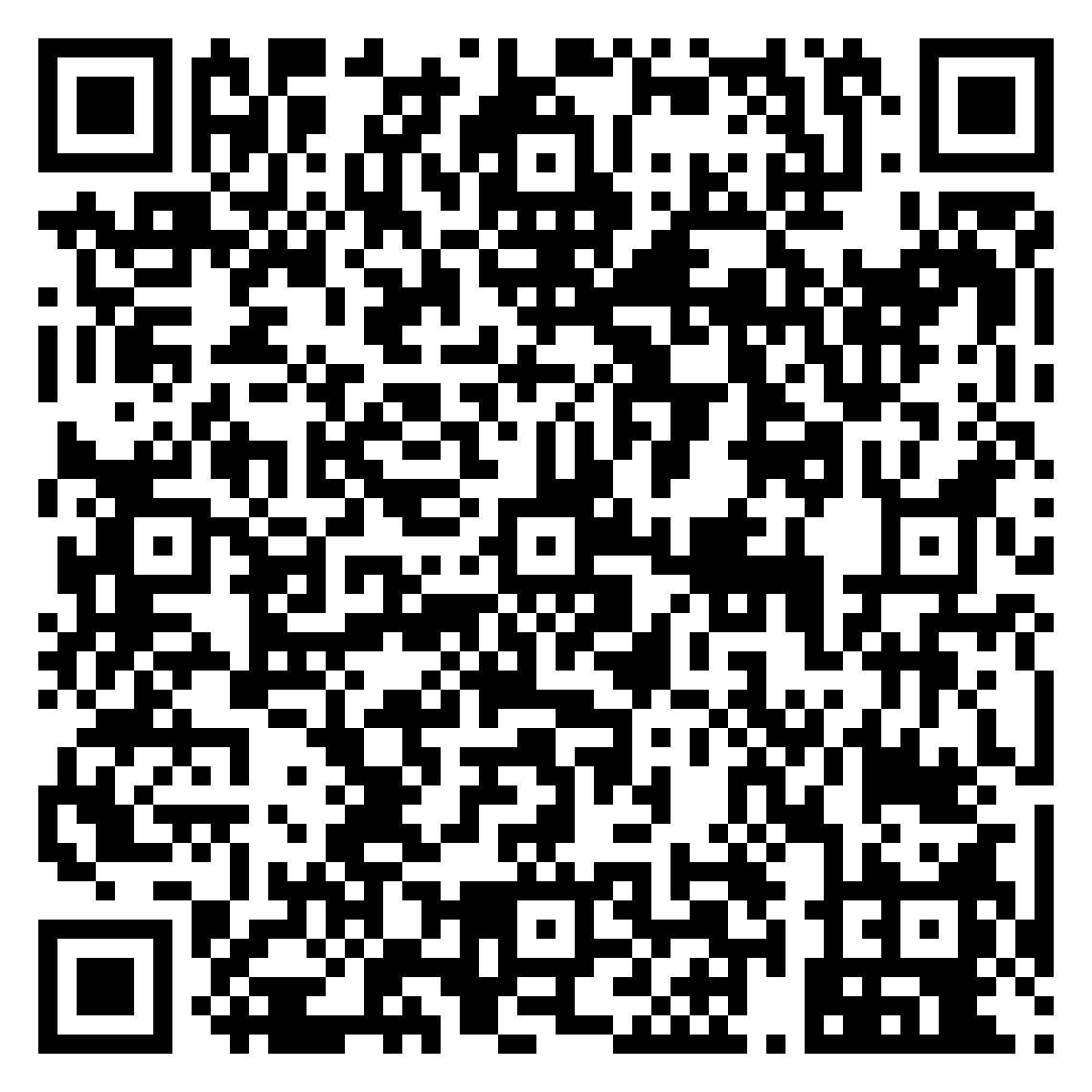
Scan to view on your phone
Point your camera at the code to open this report on your own device.
Specs
The complete GAMECAM system spec — hardware, AI and player experience, club management and live tournament production.
| Feature | Description |
|---|---|
| GAMETRAQ 6 AI Camera | Award-winning next-generation 4K AI camera delivering up to 90 FPS. Built-in GPU enables real-time video processing, player tracking, performance analysis and video analytics. Includes Wi-Fi, Zigbee and Bluetooth connectivity together with a purpose-built court mounting bracket. |
| Camera Mount | Purpose-built mounting solution designed for secure installation and the optimal camera angle on the padel court. |
| SLAMS Wireless Button | Wireless courtside button panel with 4 buttons. Players can update the score, save rallies and instantly mark their best moments as highlights. Battery powered with up to approximately 3 years of battery life. |
| GAMECAM TV Device | Device that connects to any existing club TV via HDMI and transforms it into an interactive media screen displaying automatic highlights, player rankings, leaderboards, club information and sponsor content. |
| Feature | Description |
|---|---|
| AI Game Report | Automatically generated post-match report containing the full 4K match video, AI-generated highlights and performance statistics for all four players. |
| AI Performance Metrics | Tracks player and match data including running distance, heatmap, time in transit zone, zone map, error-shot tracking, shot types, spider chart comparison, ball possession and shot labeling. |
| AI Highlights | Automatically identifies memorable rallies and moments from the match and turns them into video clips ready to watch, share on social media or display on GAMECAM TV. |
| Virtual Coach | An AI-powered coaching experience that analyzes the player's match and provides personalized feedback and insights based on what happened on court. |
| Best Of The Game | The best of the game, boiled down to a 3 minute video recording of the game. |
| Full Match Video | Players can access their complete recorded match after play, together with highlights, statistics and AI analysis. |
| Watermark & Sponsor Logo | Add club, tournament or sponsor logos directly to recorded and streamed video, creating additional branding and sponsorship value. |
| Feature | Description |
|---|---|
| GAMECAM Dashboard | Central management platform for all GAMECAM services. Monitor cameras, manage videos, analytics, streaming, monetization, settings and club features from one place. |
| API | API endpoints allowing partners and clubs to integrate GAMECAM video, player data, statistics and services into their own apps, booking systems and digital environments. Extra fees will be charged if any customized needs are requested. |
| Revenue Program | Enables clubs to create a new recurring revenue stream by charging players for access to GAMECAM video, highlights, AI reports and performance services. |
| GAMECAM TV | Automatically displays recent highlights, rankings, leaderboards, club information and sponsor content on screens throughout the venue. |
| Feature | Description |
|---|---|
| YouTube Live Streaming | Stream matches directly to the club's own YouTube channel with a simple setup from the GAMECAM dashboard. |
| Instagram Live Streaming | Start live streaming to Instagram directly from the dashboard with only a few clicks. |
| Game Control | Professional tournament-production interface with control over player names, live scoring, graphics and sponsor advertising. Sponsor videos can automatically be displayed during breaks, side changes and other pauses in play. |
| Score & Player Graphics | Display player names, scores and tournament graphics directly in the live broadcast. |
| Sponsor Advertising | Add logos, graphics and video advertisements to live streams and recorded matches to create new commercial opportunities for clubs and events. |
Testimonials
From beginner fun to pro-level scouting — here is what the GameCam community says.
Tool for all strategies of players. Beginners enjoy the stats for added fun in their games. Intermediate use stats to track progress and improve. Pros analyze opponents' strengths and weaknesses for a competitive edge.
Rodry Ovide
Pro Coach — coaching Paquito Navarro
Spain · World Padel Tour

GAMETRAQ has transformed our venue by offering a unique and enjoyable experience for players.
Carl-Johan Blum
Club Manager, PDL Center Sweden
Sweden · Multi-court padel venue

As a club manager I get a lot of good feedback from players using the GAMETRAQ system.
Rickard Holmström
Padel · Tennis · Coach
Norway · Player and coach
FAQ
GAMETRAQ 6 runs a 12 TOPS on-device AI processor that analyses every frame at 4K / 90 FPS directly on the camera. Ball impacts, shot types (smash, volley, lob, bandeja, vibora), player positions and court coverage are detected frame-by-frame with zero cloud round-trip.
Every match produces the full AI game report: rally length, shot speed and shot types, win rate by court zone, reaction time, running distance, sprint bursts, error shot tracking and player heatmaps — the same professional-grade data used by top ATP and WPT teams.
Because processing happens on-device, highlights, stats and shareable clips are pushed to the player's phone within one second of match point. Players walk off the court with a full AI game report already delivered.
No. One press starts an auto-framed 4K live stream on the club's own YouTube channel — no laptop, no external encoder and no camera operator needed. Scoreboard overlays and sponsor watermarks are added automatically.
Each court gets the GAMETRAQ 6 AI camera with its mounting kit, the SLAMS wireless button for the net post, and the GameCam TV device — a plug-in box that connects to any club TV over HDMI. One camera covers a full court.
It mounts on the net post and lets players update the live game score with one press, save their own highlights during play, and control the stream — completely wireless, battery powered, no wiring on court.
GameCam TV turns your club TV into a live channel: a mosaic of all courts, instant replays, automatic highlights, live rankings and results, club information and sponsor advertising. It's included with every GAMETRAQ 6 plan — there is no separate fee.
Through the built-in revenue program: paid AI game reports per player, sponsor watermarking on streams and highlights, premium pricing on camera courts and higher hourly rates. Clubs typically report €3,000–4,000 per court per month.
All prices EUR per camera. Monthly: €250/month plus €950 one-time camera payment; first-year total €3,950; following years €3,000/year billed monthly. Yearly: €3,000 first year paid upfront, camera hardware included; from year two €2,000/year paid annually. Annual renewal equivalent €166.67/month, billed annually only — not a monthly payment option. Save €950 in the first year and €1,000 every following year with yearly compared with monthly. Both include automatic match recording, automatic highlights, AI player analytics, AI coaching, remote installation support, software updates and remote support. Prices exclude VAT and shipping (€310 per order); on-site installation quoted separately. Existing 24-month agreement and other terms apply.
Pairs perfectly with
Add the wireless LED scoreboard and the live score appears on court, in the stream overlay and in every game report. Clubs that run both get a full arena experience on every court.
Our customer journey
Six simple steps — the GAMECAM team is with you from day one.
Order the cameras and send us your court, network and delivery details.
We plan the installation with you and check the result before you go live.
We train your staff, follow up after 30 days and stay reachable on WhatsApp.
You order and send us your company, contact and delivery details.
You tell us how many AI cameras you need and the Wi-Fi name and password at your venue.
A 30-minute call with a GAMECAM team member to plan camera position, network and power — you pick the time in the calendar.
You install from the guide, we verify image, network and coverage remotely.
We train you and your staff on the camera, the dashboard and every feature.
A 30-day review call and a dedicated WhatsApp support group that stays open.
Contact us
Tell us about your club and we'll get back with pricing and next steps.
Explore the rest of the GameCam AI padel camera system.
Book a slot
Choose a time below and we'll meet you on a video call. Confirmation arrives by email right away.
GAMETRAQ 6
Ready to order? Go straight to checkout.